
Affiliate Disclosure: Some links on this page are referral links. If you sign up through them, we may earn a commission at no extra cost to you. Our test results are not influenced by commissions.
Venice AI is the name that comes up in every “uncensored AI” conversation — and in our hands-on chatbot roundup, it was the only tool to answer every prompt with zero refusals and top-tier quality. But the free tier only tells half the story. We dug into the paid plans, generated images on the free tier, priced out video generation, and inspected the privacy settings to answer one question: is Venice AI worth $18/month?
Verdict: 8/10
Best for: Writers, roleplayers, and anyone who wants an uncensored AI chatbot with genuinely good output quality and real privacy protections. If refusals drive you crazy, this is your tool.
Not for: Anyone whose main goal is AI video on a budget — the credit math is brutal (more below). Also not for people who are happy with ChatGPT’s guardrails; you don’t need to pay to be filtered.
Bottom line: The best uncensored all-rounder we have tested. $18/month is fair for unlimited uncensored chat plus 1,000 images a day — but go in with open eyes about video credits and the free-tier image watermark.
Hands-On Test 1: Chat — 5/5
We ran our fixed 4-prompt protocol (noir fiction opener, forced-pick political opinion, tasteful romantic scene, medical-advice boundary question) on Venice’s free tier. Result: 0 refusals out of 4 — the standout score of our six-tool roundup. The noir scene was written in full with zero warnings; the socialism-vs-capitalism question got a direct, unhedged opinion; the honeymoon scene was tasteful as requested; the blood-pressure question got responsible medical guidance.
Free tier limits we observed: 10 text chats per hour and 20 images per hour in practice (the pricing page lists 10 text prompts/day and 15 image prompts/day — either way, we never hit a cap during testing). No credit card required, no paywall. One dismissible upsell for premium image models; that’s it.
See the full chatbot comparison with screenshots.
It’s Not One Model — It’s 230+
Something first-time users miss: Venice isn’t a single model. The in-app model picker (checked October 2026) offers Kimi K2.5 as the default — private, no conversation logging, history stays in your browser — plus Claude Fable 5.1, GLM 5.3 Flash, Grok 4.6, and more behind a “More models” menu. Venice says the catalog runs to 230+ open-source and frontier models, with adjustable safety settings per model.
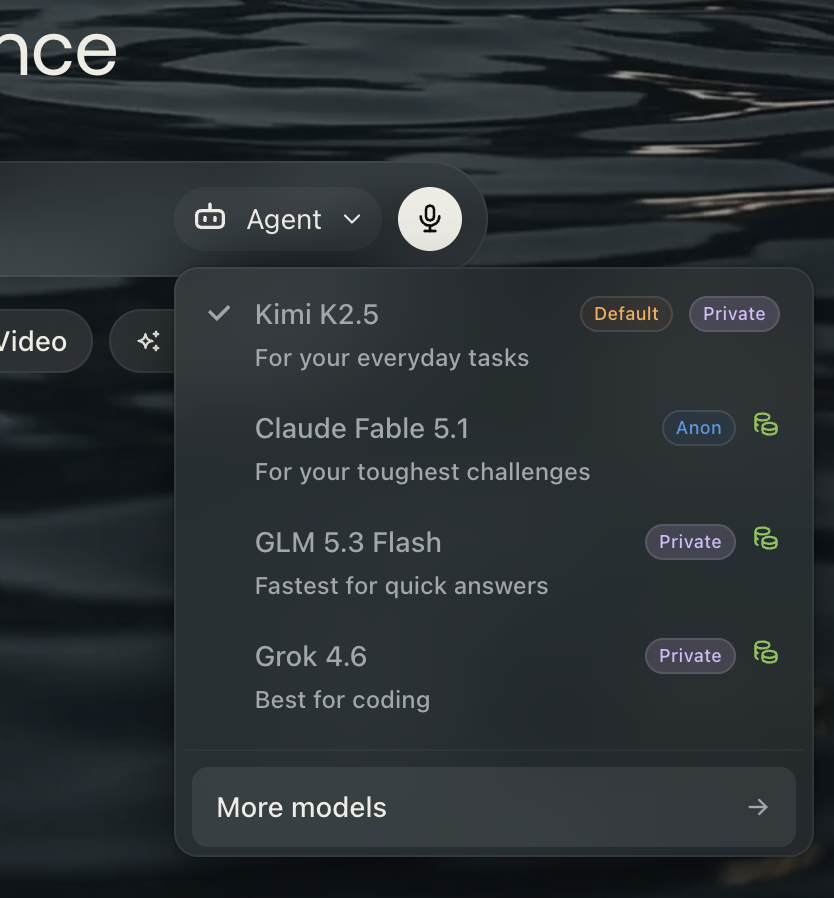
Each model carries a privacy badge. “Private” means fully private inference — your prompts are never stored or logged. “Anon” (as on Claude Fable 5.1) means the request is routed through Venice’s anonymizing proxy, with identifying metadata stripped before the underlying provider ever sees it.
The practical upshot: one $18 subscription buys private access to frontier models you’d otherwise need several separate subscriptions for. And the lineup rotates — what we saw in October 2026 will look different in six months. That’s the point: you’re subscribing to the router, not the model.
Hands-On Test 2: Image Generation — 4.5/5
We generated two images in Venice Studio on the free tier (default settings: Z-Image Turbo, 1:1, WEBP, 1024×1024):
- “A cozy cabin in a snowy forest at dusk, warm light in the windows, photorealistic” — ~13 seconds, quality 4/5.
- “Portrait of a cyberpunk street samurai, neon signs, rain, cinematic lighting” — ~9 seconds, quality 5/5.
Quality is genuinely good — fast, coherent, no filter artifacts. Two catches on the free tier:
- Watermark. Free-tier images carry a “Venice” script watermark in the bottom-left corner. There is a “hide watermark” option in the image details, but it reads as a Pro perk.
- Speed of iteration. Single-click download, upscale, edit, regenerate, and “create video from image” are all built in — the Studio UX is the best we used among free image tools.
The half-point deduction is the watermark. If you need clean images, that’s a reason to pay.
Hands-On Test 3: Video — The Credit Math Problem
We did not generate video (the free tier has 0 credits, so it can’t), but we priced it in the Video Studio UI. Venice offers Wan 2.7/3.0, Seedance 2.5, Kling, Veo, Runway, Hailuo, Pika, and Luma (text-to-video and image-to-video, 2–30 seconds, up to 1080p). A single Wan 2.7 clip was estimated at ~110 credits.
Now the math: Pro ($18/month) includes 100 credits/month plus a one-time 500 welcome credits. That means your monthly allowance covers less than one short video at those settings — the welcome credits stretch to about four or five. Costs vary by model, duration, and resolution, but the pattern is clear: the $18 plan is priced for chat and images, not for serious video work. Heavy video users are looking at Pro Plus ($68/month, 7,500 credits) or paying per use.
This is the “double paywall” complaint you see on Reddit, and it’s legitimate: $18/month for Pro, then credits on top for video and premium models. Know this before you subscribe.
Pricing Breakdown
| Plan | Price | What you get |
|---|---|---|
| Free | $0 | Base models; 10 text prompts/day; 15 image prompts/day; 0 monthly credits |
| Pro | $18/mo | All Pro models; unlimited text; 1,000 images/day; video/music/frontier models via credits; 100 credits/mo + 500 welcome credits |
| Pro Plus | $68/mo | Everything in Pro; higher image limits; 7,500 credits/mo; 2-month credit banking |
| Max | $200/mo | Everything in Plus; highest limits; 22,500 credits/mo; 3-month credit banking |
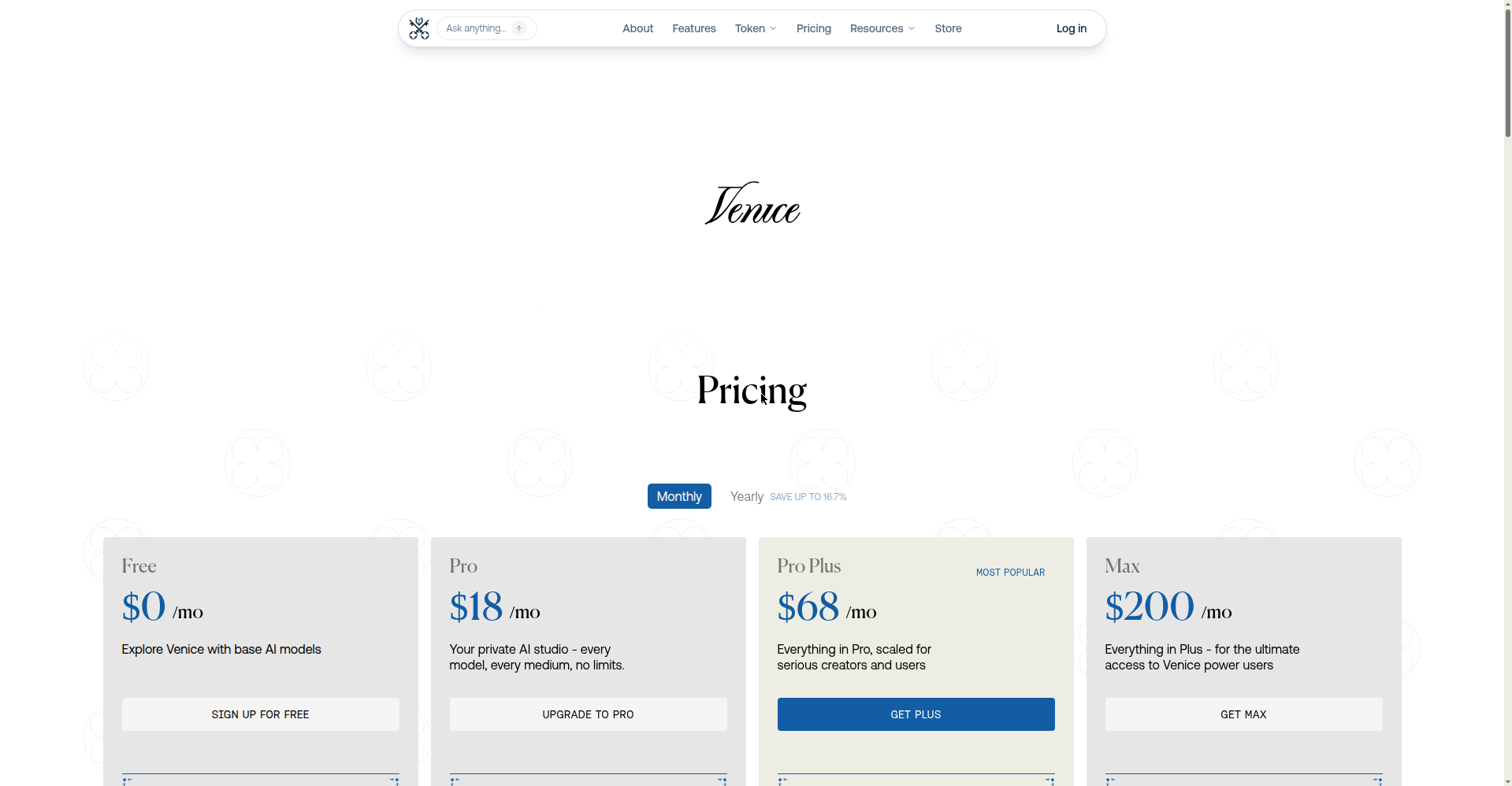
Venice Pro ($18) vs ChatGPT Plus ($20): Venice wins on freedom (uncensored models), privacy (no forced data retention), and image allowances. ChatGPT Plus wins on reasoning ecosystem, plugins/integrations, and mainstream polish. If your priority is unfiltered, Venice is the obvious pick at a slightly lower price. If your priority is capability-with-guardrails, Plus is still the default.
Is the annual math better? Venice’s edge is that the free tier is genuinely usable — 10 chats and 15 images a day is enough for casual use. Most people should live on free for a week before deciding.
Privacy: What We Actually Found
Venice markets itself as “private by design,” so we checked the Settings → General panel on a real account:
- Chats carry an end-to-end encryption note.
- You can disable browsing-data collection and hide personal info via toggles.
- There is a temporary-chats mode (off by default — turn it on if you want it).
- The adult-content filter shows as ON and locked on our account view.
- We did not find an explicit data-retention-period control — you get toggles, not a “delete after N days” dial.
Net: meaningfully more private than ChatGPT or Claude (which train on and retain your chats by default), though not a zero-knowledge setup. For the privacy-conscious uncensored user, it’s the best mainstream-accessible option we’ve seen.
Canceling Takes Two Minutes
We documented the full cancellation flow separately — web (venice.ai/subscription, or Settings → Billing if it redirects), iPhone, and Android, plus the complaints to watch for (third-party billing, charges after canceling). Read the step-by-step cancellation guide.
Venice vs the Free Alternatives
- Perchance AI Chat — free forever, no signup, unfiltered. But 2/5 quality in our tests. Good backup, not a replacement.
- Grok — free, least-filtered mainstream option, 4.5/5 quality, zero hedges in our test. The strongest free alternative if you don’t need Venice’s privacy story.
- Venice free tier itself — honestly enough for light use. Try before you pay.
FAQ
Is Venice AI really uncensored?
In our hands-on test: 0 refusals out of 4 prompts spanning fiction, politics, romance, and medical boundaries. It blocks illegal content like every legitimate service, but on legal creative and controversial topics it does not moralize or refuse. See the evidence.
How many credits does a Venice video cost?
Around 110 credits for a short Wan 2.7 clip at default settings in our check — costs vary by model, length, and resolution. Pro’s 100 credits/month covers roughly one such video; the 500 welcome credits stretch further.
Can I use Venice AI for free?
Yes — 10 text prompts and 15 images per day, no credit card. Free images carry a “Venice” watermark, and video requires credits (free tier has none).
Is Venice AI private?
More private than ChatGPT/Claude: encrypted chats, toggles to disable data collection, no forced retention we could find. Not zero-knowledge, but the best privacy story among uncensored options we tested.
How do I cancel Venice AI?
Web: venice.ai/subscription (or Settings → Billing) → Cancel subscription. iPhone/Android: cancel via Apple/Google Play subscriptions. Full guide here.